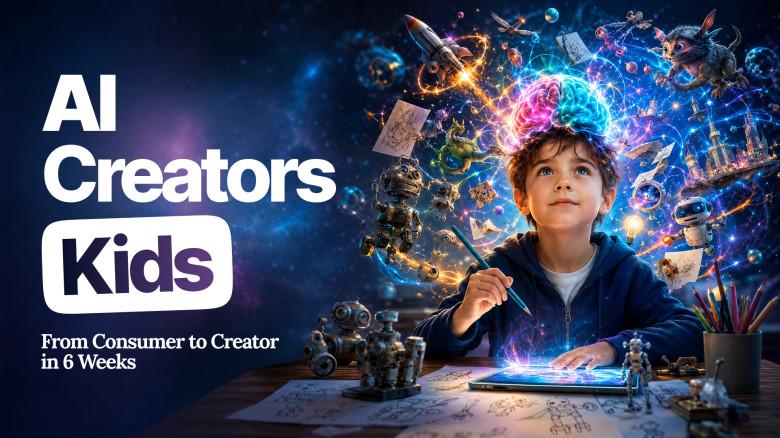
AI Creators Kids: From Consumer to Creator — Your Child's First AI Cartoon in Just 6 Weeks
Is your child a Consumer or a Creator? The world trains them to CONSUME. TikTok. YouTube. Endless scrolling. Hours of it, every day. We teach them to CREATE — with the same AI tools the next generation will run on. In 6 guided weeks, AI Creators Kids turns passive screen time into your child's first real AI cartoon, built from scratch. It's not about more screen time. It's about better brain time. Future-proof their brain. Turn consumption into creation. Start today.
We guarantee to refund the course purchase price, if the course did not meet your expectations. To request a refund, please email our Support Service at [email protected] within 14 calendar days from the purchase date.
Comments about the course
-

My daughter now makes her own cartoons instead of scrolling TikTok — SUPER 🔥 6 weeks ago she was a consumer. Now she's a creator. I genuinely can't believe the shift.
-
My son watched AI cartoons for hours every day. After Week 1 he made his FIRST AI character and ran around the house showing everyone 😭 I realized he didn't know he could CREATE — he just thought AI was something to watch.
-

I always said AI would make my son lazy — that he'd use it as a crutch for everything. This course flipped it. He's learning to USE AI, not lean on it. He even spotted ChatGPT getting something wrong this week and corrected it himself 💯 Tool, not a crutch — that's the difference.
-
Best line my 9 y.o said after Week 2: 'Mama, I'm using my SUPERPOWER!' She meant AI. She gets it now — it's a tool to MAKE things, not a magic answer machine. I never thought she'd understand that at her age 🥹
-

Safe, fun, and honestly a skill for life. My 10 y.o made a full animated cartoon and showed it to her grandparents on a video call — we all cried 💚 She created something with AI at 10 years old. I never thought it was possible at this age.
-

Best $1 I ever spent. Other parents are paying $300+ for AI camps with free intros that turn into upsells. We did this at home and my son has a finished AI cartoon in his portfolio 🙏 Prompting, story structure, editing — these skills are real. I'll never look back.
Course includes
It's Not About More Screen Time. It's About Better Brain Time.
Here's what nobody tells you: every hour your child scrolls TikTok or YouTube trains their brain for one thing — to consume. Watch. Scroll. Swipe. Repeat. The YouTube cofounder admitted it himself: "shorter content equates to shorter attention spans". That's not a theory. That's the platform confessing.
And right now, your child's brain is wiring itself — for life. The habits they build this year become the mind they carry at 25. If scrolling is the habit now, scrolling is who they become. That window is open today. It won't stay open.
You feel it but can't name it: those hours teach your child nothing. Not building. Not thinking. Not making. Just consuming.
Now imagine the opposite. Your child runs to show you something they made. Eyes lit up. "Look what I created".
Meanwhile, 88% of parents say AI will be crucial to their child's future — and almost none of us know where to start. The kids who do touch AI mostly use it as a crutch: typing in homework, copying the answer, treating it like a magic answer machine.
But the kids who write their own prompts, design their own characters, fix what AI gets wrong, build their own stories? That's where every future creator comes from. That's the path AI Creators Kids puts your child on. In 6 weeks they stop scrolling and start making — a real AI cartoon, real creator skills, and habits that outlast every app.
Two tracks: Guided Creator (7–9) and Independent Creator (10–12). Safe, kid-friendly tools. One finished AI cartoon your child made themselves.
Your child will:
- Design their own original AI character from scratch
- Write a full story with ChatGPT — and master prompt writing, the new literacy of the AI generation
- Build animated scenes in Canva Magic Studio
- Record their own voiceover and add music in CapCut
- Assemble and export a real animated cartoon they can show
- Walk away with their first project in an AI Creator Portfolio
Beyond the Cartoon: 7 Real Skills Your Child Develops
Here's the fear every parent has about AI: it'll make my kid lazy. Kill their thinking. Destroy creativity. That's true — when AI is a crutch. The opposite is also true: kids who make with AI build the exact skills consuming AI destroys. Because creating something real requires more thinking, not less.
Every lesson trains 7 future-ready skills:
- Storytelling — Building characters, problems, and resolutions your child owns
- Prompt Thinking — The new literacy of the AI generation: learning to ask better questions
- Visual Thinking — Choosing what looks right, and understanding why
- Digital Literacy — Using AI tools safely, creatively, responsibly
- Editing Skills — Assembling images, voice, music, and timing into one finished piece
- Critical Thinking — Spotting what AI gets wrong and fixing it, because AI lies confidently
- Creative Confidence — Going from idea to finished project, and owning it
By Lesson 12 your child has a cartoon to show. By year's end, skills that compound for life. That's why it's a skill for life.
How Does It Work?
This isn't a tutorial. This isn't a "kids and AI" overview. AI Creators Kids is a project-based course built around one outcome: your child finishes with a real AI cartoon they made. Two guided tracks for ages 7–12.
- Step 1: Become the Creator — Your child meets the AI tools, learns what a prompt is, and creates their first AI image. The identity shift starts here: from consumer to creator.
- Step 2: Build the Story — Using ChatGPT, your child writes a real story with a hero, a problem, and a solution. They learn that better prompts make better stories. The tool not crutch mindset gets built here.
- Step 3: Create the Visual World — In Canva Magic Studio your child brings the story to life — generating characters, scenes, and a consistent visual style.
- Step 4: Add Voice and Sound — Your child records their own voiceover in CapCut, adds music and sound effects, and learns how sound makes a story come alive.
- Step 5: Assemble and Premiere — Rough cut, polish, final export. Ends with a family premiere your child will never forget.
You'll see the change: the scrolling stops. The "I'm bored" stops. Your child starts asking "can I make one of these?" — and now they can.
Week 1 → first AI character.
Week 3 → full story written, scenes built.
Week 5 → voice recorded, cartoon assembled.
In 6 weeks → final export, grand premiere, first project in their portfolio.
In just 6 guided weeks — your child goes from consumer to creator.
Why choose this course?
You've seen $300 AI camps. You've seen free trials that turn into expensive upsells. You've seen 1-hour YouTube tutorials that don't actually teach anything. None of those give your child what they really need — a real project, real skills, and the maker brain that lasts.
- No Tech Experience Needed — Works for every child ages 7–12, and every parent — even ones who've never opened ChatGPT.
- Safe, Kid-Friendly Tool Stack — Uses only Canva, ChatGPT (parent account), and CapCut. Free, widely-trusted, no surprise paywalls.
- Guided, Project-Based From Day One — Every lesson builds one piece of the final cartoon. No filler. No "AI overview." By the end your child has a real finished project.
- Seven Real Skills, Not Just AI Tricks — Storytelling, prompt thinking, visual thinking, digital literacy, editing, critical thinking, creative confidence. The full creator stack.
- Not a Live Class. Not a Free Trial With Hidden Upsells. Just $1 for a finished project — and a skill for life — your child will keep.
You don't need to be a tech parent. You just need 6 weeks and a child ready to make something. Start today.
Academic plan
10 video lessons
- Lesson 1. Become an AI Creator
- Lesson 2. Create Your Hero
- Lesson 4. Let AI Write Your Prompts
- Lesson 5. Create Your World
- Lesson 6. Build Your Visual Style
- Lesson 8. Add Music and SFX
- Lesson 9. Assemble Your Movie: Rough Cut
- Lesson 10. Polish & Refine
- Lesson 11. Final Export
- Lesson 12. Grand Premiere

After payment, you can immediately start practicing
- Click the "Get Access" button, enter your email in the field and you will be taken to a secure payment page.
- Complete the order process and you will instantly receive a password to access your personal NEWMINDSTART account.
- Take lessons, perform practical tasks, ask the author questions and discover new courses.
FAQ